Rome Simulator – Play Free Simulator Browser Game Online
| Game Category | |
| Plays |
34
|
| Platform | Browser |
| Rating |
5/5 (5 reviews)
|
About the Game
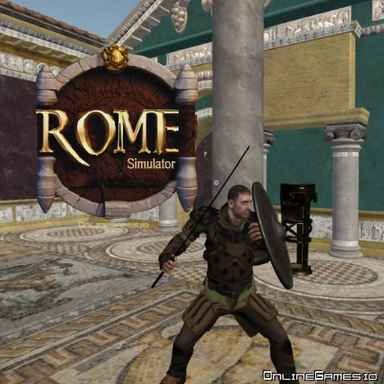
You are a gladiator in ancient Rome, unarmed at the start, exploring a vast castle of breathtaking historical detail while other guardians are doing their best to make sure you do not leave it. Rome Simulator is a 3D action game set across two maps of the same castle, interior and exterior, where the architecture is genuinely spectacular and the combat requires finding weapons before the first serious encounter rather than hoping your bare hands are enough. The visual fidelity of the Roman setting and the melee combat system make this one of the more immersive browser action games available.
The Interior
The inside of the castle is a royal space filled with arches, statues, and mosaic stone floors that establish the historical atmosphere immediately. Exploring the rooms serves two purposes simultaneously: taking in one of the more visually impressive environments in a browser game and locating the weapons you need before the guardians who protect this place find you first. The Ironhand Sword, Katana, Viking Metal Shield, Viking Halberd, and Viking Sword are all available to pick up with E as a primary weapon, and R equips a secondary. Having both slots filled before engaging the interior guardians is the preparation that makes those encounters manageable.
The Exterior
Gold-plated outer walls, lined altars, and open-air spaces that feel like a museum of the ancient world make the exterior map visually distinct from the enclosed grandeur of the interior. The open layout changes how combat plays out because the sightlines are longer and guardians can spot you from further away. More protectors roam the exterior grounds, which makes maintaining focus on your surroundings more important than the interior’s room-by-room exploration pace demands.
Combat
The combat system has enough depth to reward deliberate play over button mashing. Left-click attacks, right-click blocks, and the combination of left-click with Left Shift delivers a heavy attack that deals significantly more damage than a standard strike. The dive roll on Space creates distance from an incoming attack when blocking is not the right response, and crouching with C reduces your profile for approaches that benefit from a lower stance. Drawing and sheathing your weapon with G is worth understanding because moving through the castle with a weapon drawn signals your presence differently than moving without one visible.
Controls:
WASD or arrow keys to move, left click to attack, right click to block, Left Shift to run, Left Shift and left click for heavy attack, Q to jump, Space for dive roll, C to crouch, E to pick up weapon, G to draw or sheathe, 1-4 to switch weapons, Tab to pause.
Related Games
More games you might like
Guerrillas io – Play Free Simulator Browser Game Online

GTA Simulator – Play the Free GTA Browser Game

Checkout Frenzy – Play Free Simulator Browser Game Online

Edys Car Simulator – Play Free Simulator Browser Game Online

Real Flight Simulator – Play Free Simulator Browser Game Online

Cat Simulator – Play Free Simulator Browser Game Online

Limousine Simulator – Play Free Simulator Browser Game Online

Monster Truck City Parking – Play Free Simulator Browser Game Online

Idle Dev Startup – Play Free Simulator Browser Game Online
Subway Idle 3D – Play Free Simulator Browser Game Online

Tractor Farming Simulator – Play Free Simulator Browser Game Online

Battle Royale Simulator – Play Free Simulator Browser Game Online