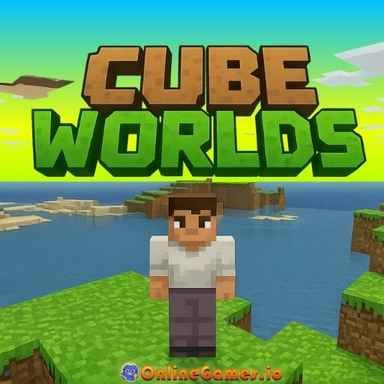
Cube Worlds – Play Free Casual Browser Game Online
| Game Category | |
| Plays |
21
|
| Platform | Browser |
| Rating |
5/5 (5 reviews)
|
About the Game
There are sandbox games that give you survival mechanics, hunger bars, enemy spawns, and a dozen other systems fighting for your attention. Cube Worlds gives you none of that. It gives you a world made of blocks, over 250 types of them, and asks you to do whatever you want with them. That is the entire pitch, and for a certain kind of player it is exactly what they are looking for.
The game sits comfortably in the same space as Minecraft’s creative mode. No mobs, no health bar, no resources to farm before you can start building. You open the inventory with B, pick your blocks, assign them to your hotbar, and start placing. Right click places. Left click destroys.
The map is large enough that finding room for any project you have in mind is never a problem. The block selection is the heart of the game. Grass, stone, glass, lava, flowers, torches, rails, beds, and over 200 other options give you a material palette wide enough to recreate almost any aesthetic you can imagine. Building a medieval castle works.
So does a modern glass tower, a underground cave system, a replica of your house, or something completely abstract. The variety of blocks means the only real constraint is your own imagination and the time you want to put in.
Flying makes everything easier and more enjoyable. Press Z to lift off and you can survey your build from any height, spot proportions that are off, get a sense of how the structure fits into the surrounding landscape, or just explore the map from the air before deciding where to start.
Flying up with Q and down with E gives you precise vertical control, and the NoClip mode toggled with X lets you pass through blocks entirely, which is useful for working inside large structures or checking the interior of something you have built from the outside in.
Speed controls give you more flexibility than most browser building games bother to include. Holding Shift gives you a movement boost for covering ground quickly. Holding Ctrl cuts your speed in half, which is useful when you need to place blocks precisely without overshooting the position you want. Together they make navigating both large open spaces and tight construction zones feel comfortable.
The fog toggle with F changes the visual range and gives you a different perspective on how your build looks at a distance. The smooth camera mode with F8 makes movement feel more fluid during exploration. The axis line display with F7 helps with alignment when you are working on something that needs to be straight. These are small options that most players will ignore entirely, but the players who need them will find them genuinely useful.
Cube Worlds does not pretend to be a replacement for full Minecraft. It knows exactly what it is: a relaxed, pressure-free building experience that loads in a browser tab and lets you zone out and make something. For that purpose it works extremely well.
Controls: WASD to move, Space to jump, LMB to destroy, RMB to place, B for inventory, Z to fly, Q to fly up, E to fly down, X for NoClip, F for fog, Shift for speed boost, Ctrl for half speed.
Related Games
More games you might like

Backflip Challenge – Play Free Casual Browser Game

Capybara Clicker Pro – Play Free Casual Browser Game
Pixelmon Town – Play Free Casual Browser Game Online

Fast Food Rush – Play Free Casual Browser Game Online

Nova Clicker – Play Free Casual Browser Game Online

Cookie Clicker Pro – Play Free Casual Browser Game Online

Troll Level – Play Free Casual Browser Game Online

Four Colors – Play Free Casual Browser Game Online

Poop Clicker – Play Free Casual Browser Game Online

Wedding Beauty Salon – Play Free Casual Browser Game Online

Mahjong – Play Free Casual Browser Game Online

Kick the Zombie – Play Free Casual Browser Game Online