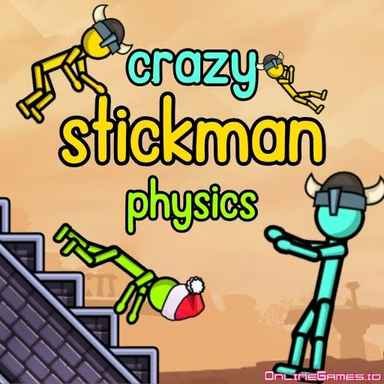
Crazy Stickman Physics – Play Free Arcade Browser Game Online
| Game Category | |
| Plays |
34
|
| Platform | Browser |
| Rating |
5/5 (5 reviews)
|
About the Game
If Stickman Destruction scratched a particular itch for you, Crazy Stickman Physics is working in the same territory. You have a ragdoll, a platform, and the singular goal of launching it into the ground as violently as possible and watching the bone-break count climb. It is absurd, it is satisfying, and it is exactly the kind of game you open when your brain needs to completely switch off.
Setting Up Your Stickman
Before anything breaks, you get to decide what your stickman looks like. The color bar lets you pick any shade you want, and as you earn coins you can dress your ragdoll in hats, caps, headphones, and accessories like a guitar or a sword. None of it affects the physics, but there is something deeply funny about watching a stickman in a top hat and a guitar shatter against the ground at full speed.
Launching and Scoring
Three settings are available at the start, each one a different platform and obstacle setup that changes how your stickman interacts with the environment on impact. You pick your platform, choose one of four jumping positions, then click and drag the directional arrow to set your trajectory. Release the click and your stickman goes flying. The key is finding the position and angle that sends it into the most objects at the highest speed, because more impact means more broken bones, and more broken bones means more coins.
Vehicles are the real score multipliers here. Unlocking and equipping one means your stickman hits the ground with considerably more force than a bare launch can produce, and the difference in bone-break count between a basic jump and a vehicle-assisted one is significant enough that saving up for your first vehicle should be a priority.
Unlocking New Platforms
Seven platforms are available in total, each with its own layout of objects and obstacles that create new opportunities for damage. Some unlock with coins, others require reaching specific levels. Each new platform genuinely changes the session because the angles, the objects in the way, and the optimal jumping positions are all different. Working through them gives the game a progression arc that keeps the core loop from feeling repetitive.
Controls: Left click, drag and drop to jump on desktop. Touchscreen on mobile.
Related Games
More games you might like

Get On Top – Play Free Arcade Browser Game Online

Basket Hoop – Play Free Arcade Browser Game Online

Stickman Destruction – Play Free Arcade Browser Game Online

Stack Fire Ball – Play Free Arcade Browser Game Online
Geometry Dash FreezeNova – Play Free Arcade Browser Game Online

Fall Brainrots – Play Free Arcade Browser Game Online

Ultimate Moto – Play Free Arcade Browser Game Online

Stunt Rider – Play Free Arcade Browser Game Online
Stickman Parkour – Play Free Arcade Browser Game Online

Drunken Duel – Play Free Arcade Browser Game Online

Motorbike Stunt Simulator – Play Free Arcade Browser Game Online

Rooftop Duel – Play Free Arcade Browser Game Online